Home Search Gallery How-To Books Links Workshops About Contact
|
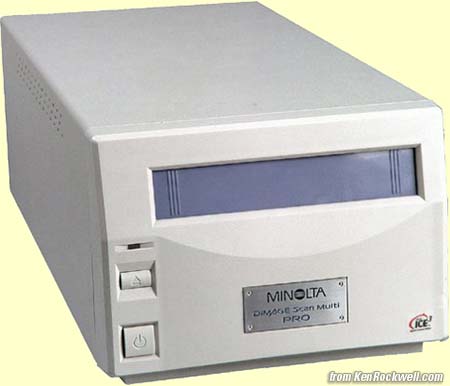
This is the best scanner I have ever used, period. Of course I've never used a real drum scanner, but I have tried the Imacons, Nikons, Epsons and Polaroids. Here are the first scans I made with it in 2001 from 6x7cm Velvia from my Mamiya 7.
January 2025 UpdateAs of 2025, I'd look for it used at this link direct to it at eBay. One only comes up every few months, so be sure to save the search to which this link takes you and set notifications to ON in your eBay account so you'll be alerted as soon as one is listed. Take the time now to read my complete How to Win at eBay series so you'll be ready when one comes up. As of 2025, they sell for about $2,500 each, used. Be warned that this great scanner uses software that ran on the computers of its time, as well as a FireWire (IEEE-1394) or SCSI connection — not USB. I'm lucky enough to have my old computer with all the software on it, but if you don't get an old computer & software when you get your Dimage Scan Multi Pro, the 2025 suggestion is to get any older Mac with a Firewire port. You can get cables to adapt between the larger (FireWire 400) and smaller (Firewire 800) connections, as Macs came with both kinds over the years. Once you've got this connected to a FireWire computer in 2025, use VuScan software and you should be good to go. VuScan is awesome; they've been making universal scanner software since the 1990s and are still at it. Also try Apple's built-in Image Capture program inside every Mac computer, which also ought to be able to run this scanner so long as you have a computer with a FireWire port. While adapters and cables are sold to go between USB and FireWire, they probably don't work; there's more going on between these formats than a simple wiring adapter can handle. Apple used to make Thunderbolt (USB-C) to FireWire 800 adapter that should work, however they're no longer sold new and are expensive used.
Below is my review from the years 2001 ~ 2005 when this was the hottest scanner out there. As of March 2005 Minolta had discontinued it. Remember, all prices and everything below is from 2005 or earlier.If you can't get a new or used one, get the $1,800 Nikon 9000 or the $600 Epson 4990. See these here I got it because I shoot a lot of medium format film. If you shoot only 35mm then get the Minolta 5400 instead if you want the best scanner you can get for less then $20,000. The 5400 costs less ($640), is a little newer and has a little more resolution than my Multi PRO. I bought this $3,000 Minolta personally and I prefer it to even the $10,000 Imacons I have tried. As of March 2004 it's down to $1,900. The Imacons are not drum scanners, even though their marketing people would like you to think so. This Minolta is the best scanner there is for scanning anything from 35mm up to 6 x 9 cm medium format film. It comes with an excellent glass carrier that easily can be adapted to any smaller film, like 16mm movie, raw APS or Minox film, too. You can scan bigger panoramic medium format film (6x12 and 6x17cm) in sections if you know how to piece them back together in Photoshop or another stitching program, although that's a pain. The only shortcoming, which is that the ICE dust removal system is very strong and thus it takes some one-pixel bites out of some sharp edges on my Velvia transparencies, is fixed with the use of a clever device called a Scanhancer. The Scanhancer also fixes the excess grain seen my the Minolta scanner with Velvia. This issue annoys some people even though it didn't bother me. By all means get the Scanhancer if you have this scanner. I thought it was bunk until I tried it and now I won't scan without it. There is a lot of information below, so click the links to go to all the pages below. Introduction and explanation of the three different versions Performance Comparisons against Nikon, Polaroid and Imacon Software Options, Installation and Performance Performance |
Home Gallery How-To Links Workshops About Contact
I bought mine here about 2001