AirPods Pro 3 User's Guide
<— back to AirPods Pro 3 Review
Charging Insertion Volume Controls
Environmentally-Controlled Volume
Multichannel Modes Remote Camera Control
Remote Listening Use as a Lavelier Mic
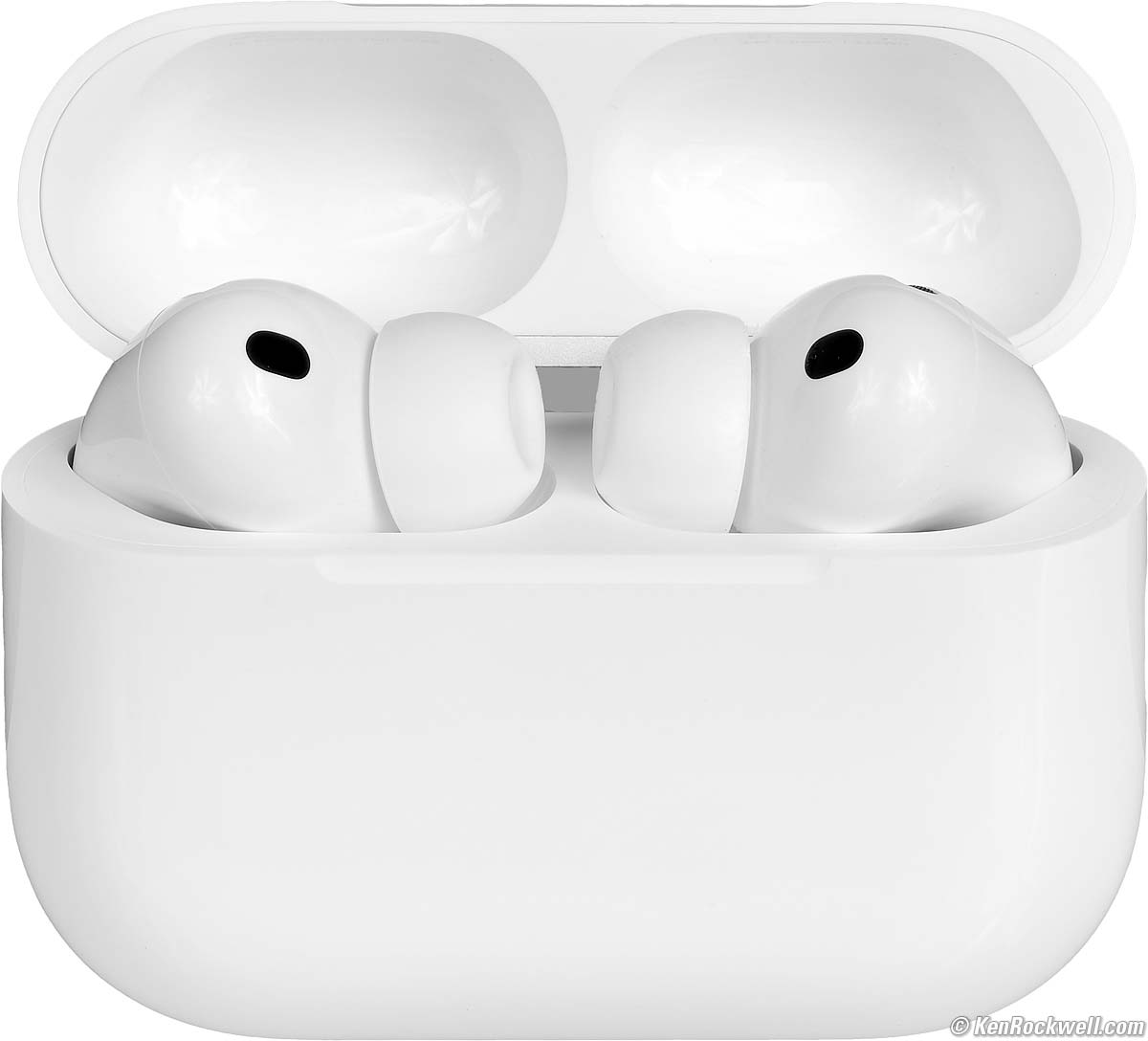
AirPods Pro 3. (1.947 oz./55.2g complete system as shown, $199.99). bigger.
I'd get mine at B&H, at Adorama, at Crutchfield or at Amazon. They're also available at eBay (How to Win at eBay), but for something as personal as this I'd stick to brand new.
This all-content, junk-free website's biggest source of support is when you use those or any of these links to approved sources when you get anything, regardless of the country in which you live. Thanks for helping me help you! Ken.
April 2026 Apple Reviews Audio Reviews Headphone Reviews Tube Amp Reviews All Reviews


I buy only from these approved sources. I can't vouch for ads below. |



Charging back to review top of user's guide
Pop them on any generic wireless charger, an Apple Watch charge cord, an Apple MagSafe charge cord or connect to just about anything via USB-C. The case sticks magnetically to an Apple Watch charge cord or MagSafe charge cord.
Even this $26 solar power bank will charge them wirelessly:
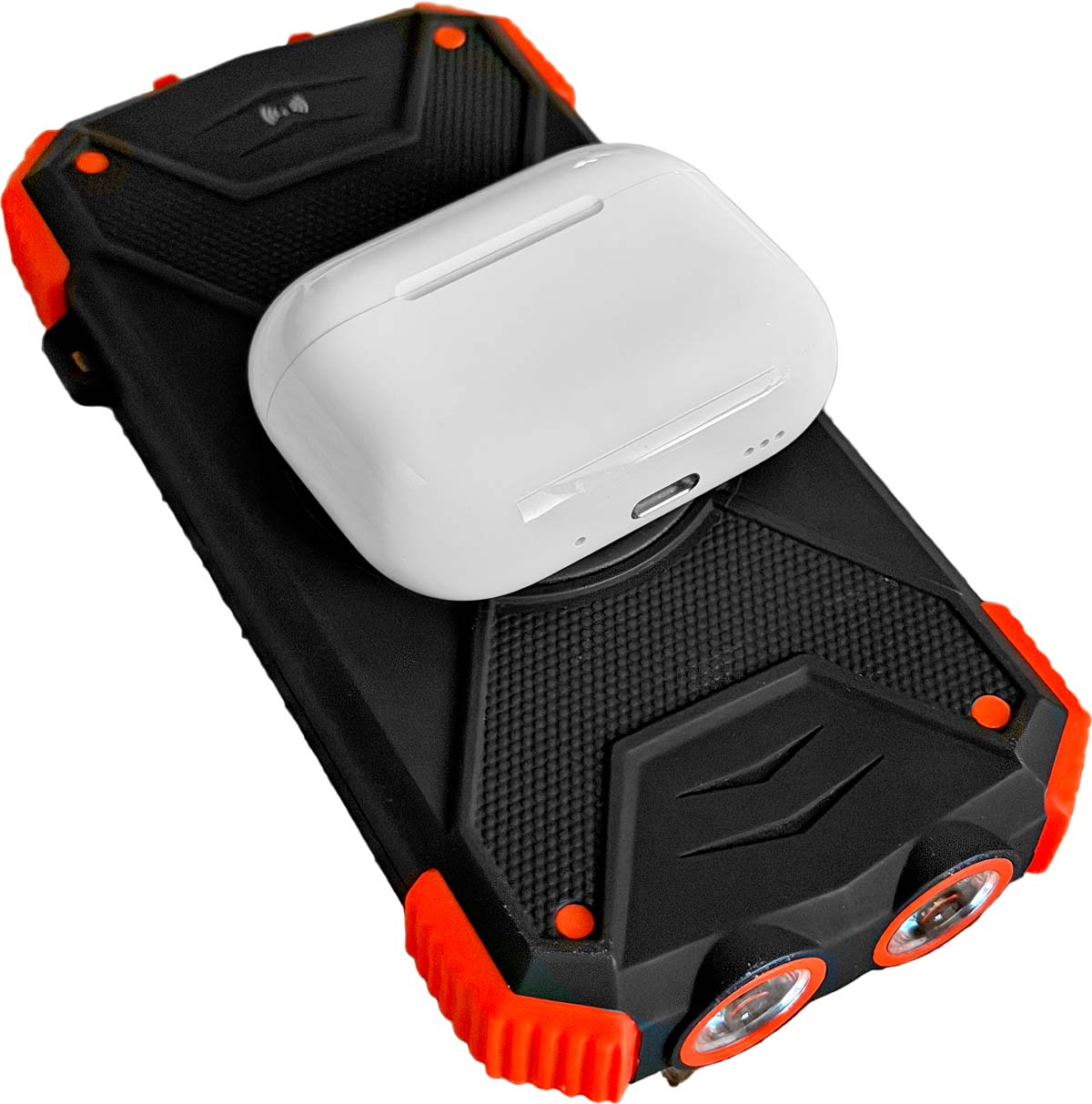
Blavor Charging AirPods Pro 3. bigger.
Use a cord to connect them to your iPhone and they will charge from the iPhone!
No, it won't charge wirelessly from an iPhone, you have to use a USB-C cord.
It charges just fine from an old-fashioned USB-A source with a USB-A to USB-C cable.
A few minutes to an hour will have you charged, and even if you somehow figured out how to run the case and both buds all the way down to 0% / 0% / 0% at the same time, it still won't take more than two hours to get the whole system back to 100% / 100% / 100%.
It draws up to 2.4W (480 mA at 5V) while charging over USB-C. I see the same power draw with the wireless charge cords.
The case will ding and light its LED when it starts charging. The light turns off after a moment, but will light up again if you move the case. More from Apple about charging and the status light.
Flip open the case to read charge in a connected device if it's not already connected.
Insertion back to review top of user's guide
Poke the rubber end in your ear, not the long skinny part.
Don't ask me how I know.
I pull up on my outer ear to make it easier.
Volume Controls back to review top of user's guide
If you need more precise level adjustment than the clicky steps of volume buttons, use the slider in the Control Center on your device.
Adaptive Noise Cancellation (ANC) Listening Modes back to review top of user's guide
These are the noise cancelling modes. Usually we select among them by holding either 'pod for a few seconds, and here's how we can select them in our iOS devices at Settings > AirPods:
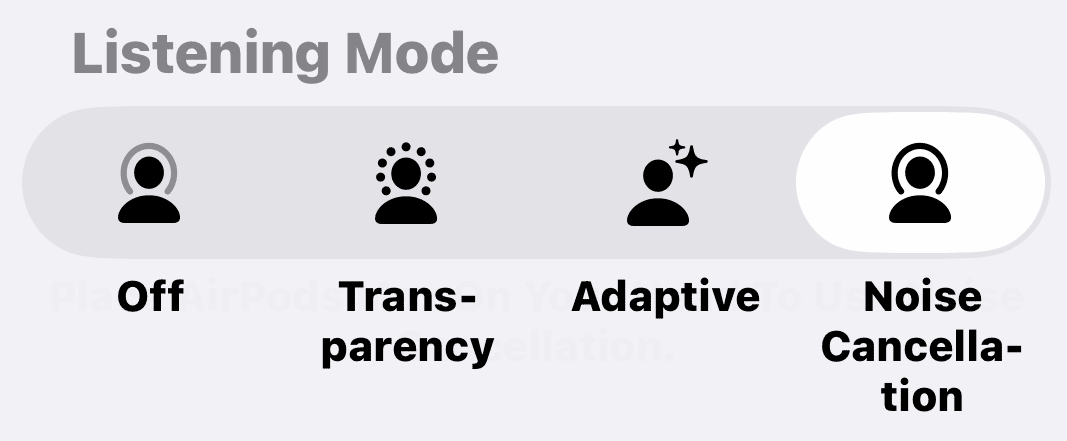
Off means no active noise cancellation. There is passive noise reduction from the seal of the AirPods Pro 3; that's the gray band on the icon. If you're in a quiet location, the OFF mode both uses less power and has a lower self-noise floor for the best possible sound from the AirPods Pro 3.
Transparency lets us hear through the AirPods Pro as if they weren't there. I find they somewhat amplify and clarify surrounding sounds.
Adaptive continuously varies the strength of noise cancelation depending on how noisy is your environment. It stays transparent if it's quiet, and increases the noise cancellation it as it gets noisier. You can adjust its sensitivity on iPhone at Settings > AirPods > Audio > Adaptive Audio and move the slider.
Noise Cancellation turns it on completely. It will open up to transparent if you start talking and you have Conversational Awareness turned on (set on the same page in iOS).
More about the various Transparency Mode settings.
These and other modes also can be set in iOS with AirPods Pro 3 connected by going to the Control Panel (swipe down from the top left) and tapping the volume control slider.
Automatic Transparency ("Conversation Awareness") back to review top of user's guide
This puts them in Transparent mode and ducks the audio when it senses you talking.
It doesn't open up if someone else starts talking to you first. If they do, just reply and then it opens up.
Set this in iOS at Settings > AirPods > Audio > Conversation Awareness.
Hearing Protection back to review top of user's guide
This turns on ANC automatically in Transparent and Adaptive modes to protect your ears from dangerously loud ambient sounds.
It does not work in OFF mode.
To be sure it's on, set it from your connected device at Settings > AirPods > Hearing Health > Hearing Protection > ON.
Environmentally-Triggered Automatic Volume Control back to review top of user's guide
This automatically raises the level if ambient sounds get louder.
How to set Personalized Volume preferences.
Setting and Getting Multichannel Modes back to review top of user's guide
Calibration
At least for iOS, with your AirPods Pro 3 connected, go to Settings > AirPods > Spatial Audio > Personalized Spatial Audio and follow the instructions to use your camera to map the shapes of your head and ears.
Sources back to review top of user's guide
I've found the most impressive multichannel sources are movies. Most music is still just plain stereo. Cue up a movie with a well-done Atmos soundtrack, like Unbroken (2014), and you're in for a treat — assuming you're actually getting it in Atmos.
Apple's"Made for Spatial Audio" playlist in Apple Music showcases the latest multichannel releases. Many classics like Dark Side of the Moon (1973) are available in new multichannel mixes — just that all your favorite songs, like The Wall (1979) probably aren't all in multichannel yet.
Even when there's a new multichannel mix, often the old 2-channel stereo version remains for streaming. Here's the 2-channel version of Dark Side of the Moon.
The best thing about new multichannel mixes is that they also often run the individual bass track through a subharmonic synthesizer before mixing to give it an extra octave of depth which sounds awesome — something that rarely works well running a final mix through a subharmonic synthesizer. I know, I've tried.
Selecting and Activating Multichannel back to review top of user's guide
iPhone and iPad
You have to enable Spatial Audio in Apple Music, otherwise all you'll see or get is regular stereo.
On iOS go to Settings > Apps > Music > Dolby Atmos > Auto or Always On.
Now Apple Music will play multichannel sound — but only if the source has a multichannel version available. In Apple Music you'll see this listed usually as "Dolby Atmos" on the playing screen. "Hi-Res" or "Lossless" is nice, but different from and not multichannel. If you're really lucky you'll see all three at the same time.
To check the multichannel status for other sources (and to turn head tracking On or Off), on iPhone and iPad with AirPods Pro 3 connected, go to the Control Panel by swiping down from the top left and tap the volume control slider.
Once tapped, there now will be options on the lower right to choose or refuse Spatial Audio, and tell you if your source is multichannel or not:
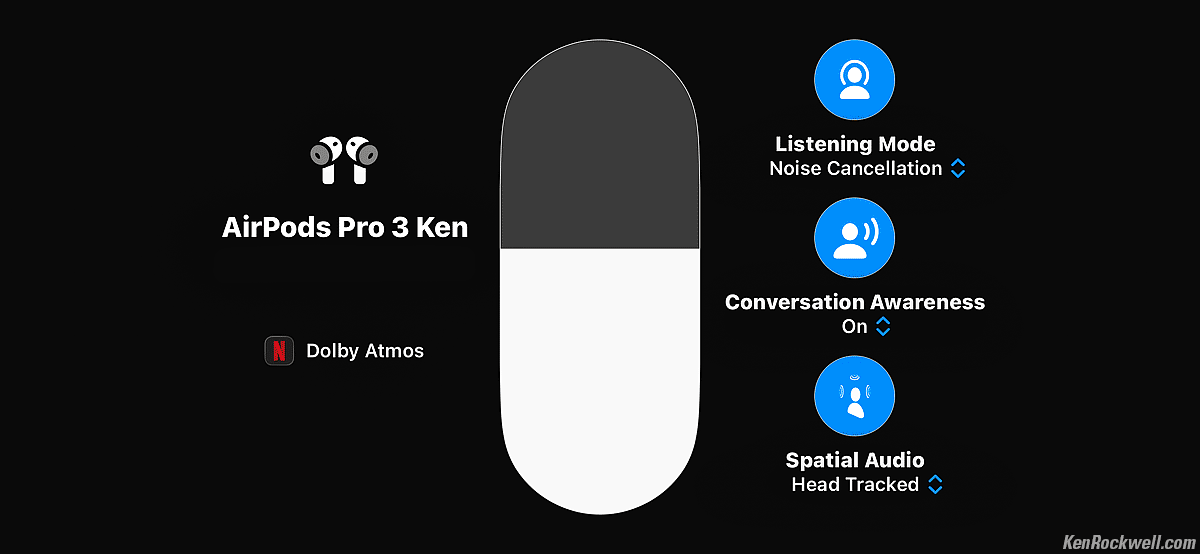
With regular 2-channel stereo (which will be most of your music), there is a sneaky option you'll see instead at the lower right called "Spatialize Stereo," not Spatial Audio as shown above.
"Spatialize Stereo" is trick mode that simulates Sparial Audio. Feel free to try it; whatever sounds best to you is the right setting — just know that Spatialize Stereo is still regular stereo, not multichannel.
On the left (otr top if held vertically), you'll see what kind of multivhannel you're getting:
DOLBY ATMOS as seen here is a specific kind of the newest "object oriented" multichannel and Spatial Audio formats. Instead of mixing to fixed speaker (channel) locations, these formats actually tell the playback hardware where to put each sound, and then the playback system steers each audio "object" to the positions defined when it was mixed. The beauty of these formats is that they don't care where you put your speakers. You tell your surround decoder or AV receiver when you set it up what kind of speakers you have and where they are, and the system takes it from there. With AirPods Pro 3, the AirPods already know how to move the sound around.
MULTICHANNEL means 5.1 and similar perfectly great audio formats that are based on fixed channel or speaker arrangements. These have been very popular with just about all movies that aren't Atmos ever since the 1950s through today.
STEREO means regular old 2-channel stereo.
Summary: After tapping the volume slider in Control Panel to get the screen above (held either horizontally as shown or vertically), look at the lower right. If it says Spatial Audio, either Fixed or Head Tracked, you're getting some kind of multichannel as shown at the left or top. If the lower right says Spatial Audio Off, or if it says Spatialize Audio (either on or off), you're getting regular stereo.
Apple TV back to review top of user's guide
With Apple TV, go to its control panel by tapping the power button on your remote. Now slide up and left and then click on the AirPods icon along the top to see this Audio Control Panel on your TV:
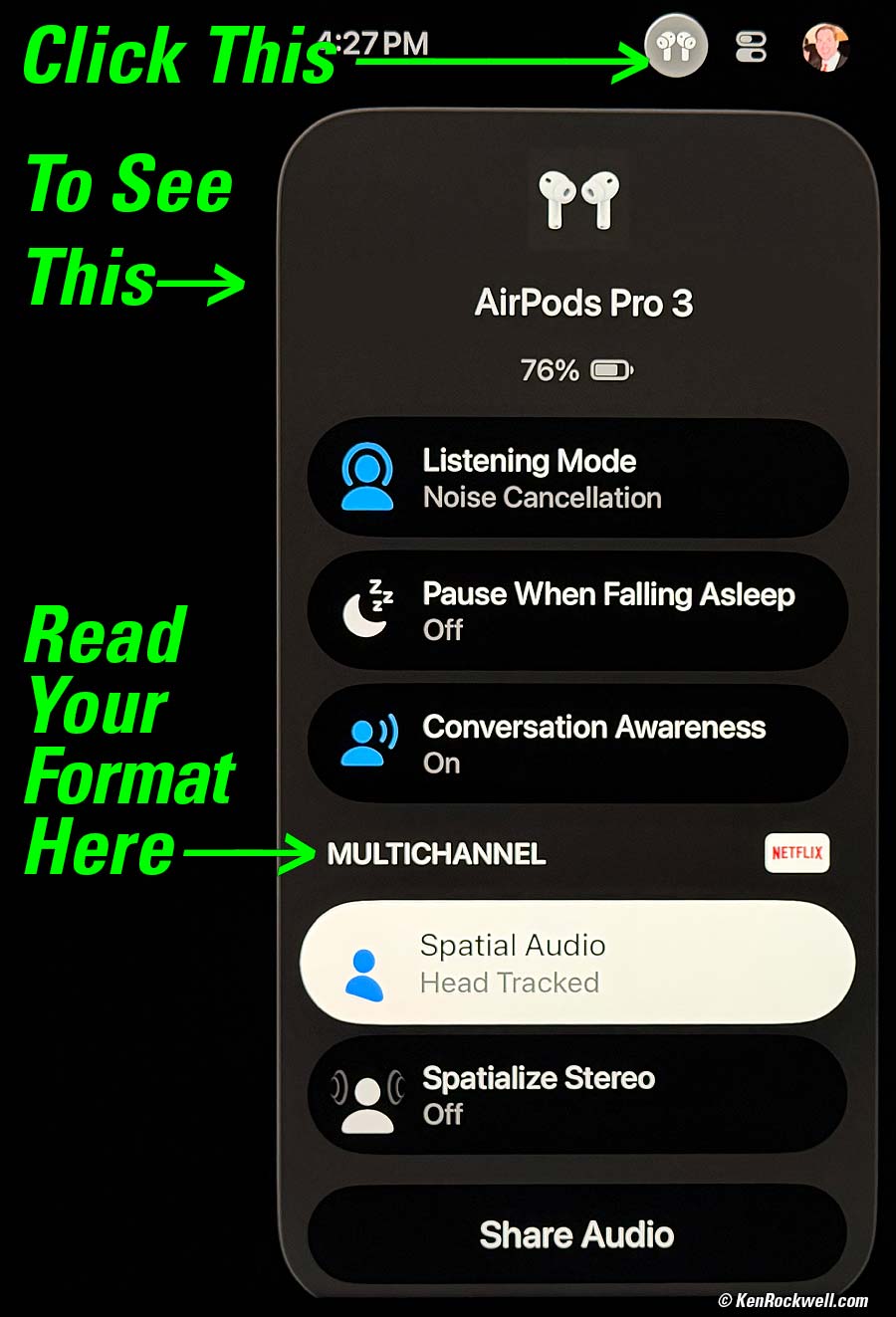
Apple TV Audio Control Panel. bigger.
Once here you can see and set everything. Two-thirds of the way down you'll see MULTICHANNEL next to the app icon of what's playing. This tells you the format you're enjoying. This indication works the same for all apps, movies, music and more on Apple TV:
DOLBY ATMOS is a specific kind of the newest "object oriented" multichannel and Spatial Audio formats. Instead of mixing to fixed speaker (channel) locations, these formats actually tell the playback hardware where to put each sound, and then the playback system steers each audio "object" to the positions defined when it was mixed. The beauty of these formats is that they don't care where you put your speakers. You tell your surround decoder or AV receiver when you set it up what kind of speakers you have and where they are, and the system takes it from there. With AirPods Pro 3, the AirPods already know how to move the sound around.
MULTICHANNEL shown here means 5.1 and similar perfectly great audio formats that are based on fixed channel or speaker arrangements. These have been very popular with just about all movies that aren't Atmos ever since the 1950s through today.
STEREO means regular old 2-channel stereo.
What's odd is that in Apple Music on my Apple TV I've seen it take several seconds to pop from playing the stereo version of a song and showing STEREO before the sound changes slightly and starts playing and displaying the DOLBY ATMOS version of the song. This is probably due to waiting to buffer enough extra data for the ATMOS version and gives you good audio without having to wait for the buffering when you first hit Play. Give it a few seconds if you just started playing something before you check the format.
When I first got my AirPods Pro 3 I was all excited to hear the glories of ATMOS and Spatial Audio. The first thing I cued up was Nile Rodgers' Spatial Audio promo video on Apple Music — and the video played in MONO! I'll admit that it took me at least half an hour checking every possible thing, and what I finally discovered was that for some unknown reason my Apple TV had set itself to Mono in Settings > Accessibility. I have no idea why it would have done that seeing how it was fine a day before.
I mention this because it is something you should check just in case. Many people who haven't earned a living in audio might not realize what Mono sounds like (like my audiophile friends who go years with with speakers connected out-of-phase), and if your Apple TV pulls this trick on you you'll miss out on an entire universe of huge sound. I still have no idea how or why mine set itself to Mono.
The world of multichannel audio has been well standardized for decades and decades and decades in motion picture studios and theaters, but things are still getting worked out for music. Therefore sometimes things will or won't play in multichannel, or format indications can vary. I'll admit that writing this article I pulled up Nile Rodgers' Spatial Audio promo video on Apple Music and it sounded glorious in Atmos, but then the next day it was only playing in regular stereo on my iPhone in Apple Music.
Remote Camera Control back to review top of user's guide
Remote Listening: "Live Listen" back to review top of user's guide
I haven't tested it to see if it's in Stereo or Atmos, or just mono, or how far away you can get.
Use as a Lavalier Mic back to review top of user's guide
See the bottom of this page to use them as a lavalier mic while recording video.
I'd get my AirPods Pro 3 at B&H, at Adorama, at Crutchfield or at Amazon. They're also available at eBay (How to Win at eBay), but for something as personal as this I'd stick to brand new.
<— back to AirPods Pro 3 Review
© Ken Rockwell. All rights reserved. Tous droits réservés. Alle Rechte vorbehalten. Alla rättigheter förbehållna. Toate drepturile rezervate. Niciun vampir nu a fost implicat în crearea acestei lucrări. Doe! Omnia jura reservata. Ken Rockwell® is a registered trademark.
Help Me Help You top
I support my growing family through this website, as crazy as it might seem.
The biggest help is when you use any of these links when you get anything. It costs you nothing, and is this site's, and thus my family's, biggest source of support. These places always have the best prices and service, which is why I've used them since before this website existed. I recommend them all personally.
If you find this page as helpful as a book you might have had to buy or a workshop you may have had to take, feel free to help me continue helping everyone.
If you've gotten your gear through one of my links or helped otherwise, you're family. It's great people like you who allow me to keep adding to this site full-time. Thanks!
If you haven't helped yet, please do, and consider helping me with a gift of $5.00.
As this page is copyrighted and formally registered, it is unlawful to make copies, especially in the form of printouts for personal use. If you wish to make a printout for personal use, you are granted one-time permission only if you PayPal me $5.00 per printout or part thereof. Thank you!
Thanks for reading!
Ken.